A nail salon makes Google Ads pay only when the cost per booking stays below what a new client is worth. Using stated assumptions, $900 a month at a $4.50 click and a 7% click-to-booking rate gives about 14 bookings at roughly $64 each. Published benchmarks offer a rough sense of scale, not a target for any one city. This guide covers campaign structure, budget split, bidding, booking tracking and break-even math for salons in the US, UK, Australia and Canada. Dollar figures are US examples; run the same arithmetic in local currency.
How Much Does a Click Cost a Nail Salon?
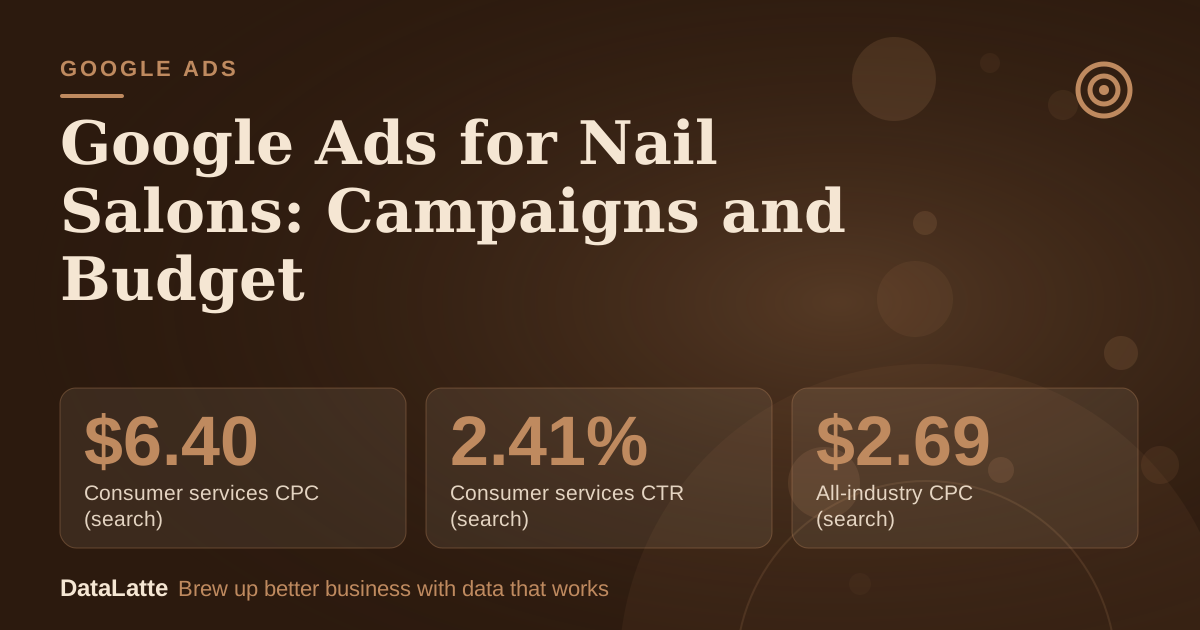
WordStream's benchmark page does not list a nail salon or beauty category in the figures it shows. The closest line is Consumer Services, with a search cost per click of $6.40 and a search click-through rate of 2.41%. The all-industry search averages on the same page are $2.69 per click and 3.17% click-through.
→
Consumer services CPC (search)
WordStream benchmark
→
Consumer services CTR (search)
WordStream benchmark
→
All-industry CPC (search)
WordStream benchmark
→
All-industry CTR (search)
WordStream benchmark
See Sources at the end of the article. Cards marked Assumption are examples, not results.
The page says it is updated regularly, so check the current report before relying on these figures. As simple division, $900 buys about 141 clicks at $6.40 and about 335 clicks at $2.69. Keyword estimates for your own city will be more useful than any national average, and your first month of tracked data will be more useful still.
How Should a Small Budget Be Split?
Many salon accounts waste money because one campaign holds every keyword, and broad, expensive terms absorb budget meant for high-intent searches. Splitting by intent keeps booking-ready searches funded. The shares below are a planning assumption, not a platform rule.
| Campaign | What goes in it | Planning share of $900 (assumption) |
|---|
| 1. Services and location | Ad groups for gel, acrylic, dip powder and pedicure, plus "near me" and neighbourhood terms | 80% ($720) |
| 2. Brand | Your salon name, exact match only | 5% ($45) |
| 3. Seasonal | Prom, wedding and holiday offers, switched on a few weeks ahead | 15% ($135), held back |
If nothing seasonal is coming up, keep the 15% in Campaign 1 until it is needed.
Within Campaign 1, build one ad group per service. Someone searching "dip powder nails" should see a headline that names dip powder, not a generic salon ad. The full term lists are in the
nail salon keyword guide. A similar structure works for salons offering cuts and colour, as covered in the
hair salon guide.
Which Bidding and Budget Settings Suit a New Account?
A new account benefits from manual control. Until a few weeks of bookings are tracked, use manual bidding on exact and phrase match keywords. This stops spending from building up on expensive terms before it is clear which ones book.
For the daily budget, use a planning assumption of dividing the monthly figure by 30. On $900 that is about $30 a day. Daily spend will vary, so judge the account across the month rather than on a single day.
Once bookings arrive steadily, test automated bidding in one campaign and compare cost per booking with the manual campaign. Display campaigns can reach people across 35 million websites and apps, plus YouTube and Gmail, according to
Google's Display campaigns help page. For a salon with a fixed budget, keeping Display out of the first phase is a reasonable choice, because Search reaches people already looking for a service. Automated formats are covered in the
Performance Max guide once booking data exists.
How Should Ads and Location Targeting Work?
Headlines should repeat the search: service, area and a reason to book now. Examples include "Gel Nails in [Neighbourhood]", "Walk-Ins Welcome Until 6pm" and "Book Online in 60 Seconds". Use "same-day appointments" only if the salon honours it, and claim "top rated" only if reviews support it.
For location, check the last 50 bookings and note where those clients live or work. Draw the radius around that pattern rather than a guess. A presence-only setting helps avoid paying for people elsewhere who search your city, since walk-in clients usually come from nearby.
Call and location assets add a phone button and address to the ad. Schedule call assets only for hours when someone answers the phone, so a missed call does not cost a click. Salons that also offer services like Google's pay-per-lead format should first check the
Local Services Ads guide to see whether they qualify.
How Do You Count Bookings Instead of Clicks?
Salon enquiries arrive by online booking, phone call and form. Set up all three before the first ad runs, and confirm each one is recorded. Many booking platforms can send completed bookings back to Google Ads, but not all do, so check your platform's help centre and ask whether it passes conversions.
Make a test booking after clicking your own ad. If the booking does not appear as a conversion, fix tracking before spending more.
The landing page affects results as much as the ad. Send clicks to a service page with prices, photos of recent work, real reviews, a tap-to-call number and one clear booking button. Offline channels can support the same local demand; the
digital out-of-home guide for nail salons covers one non-search option.
What Does the Math Show for $900 a Month?
Every input marked assumption is an example, not a market figure. The base click cost sits close to the Consumer Services benchmark above, with a lower and higher case around it.
| Line | Tough | Base | Strong |
|---|
| Monthly budget (assumption) | $900 | $900 | $900 |
| Cost per click (assumption) | $5.50 | $4.50 | $3.50 |
| Clicks ($900 divided by click cost) | 164 | 200 | 257 |
| Click-to-booking rate (assumption) | 4% | 7% | 10% |
| Bookings | 6.6 | 14 | 25.7 |
| Ad cost per booking | $137 | $64 | $35 |
| First visit ticket (assumption) | $65 | $65 | $65 |
| Visits in first 12 months (assumption) | 3 | 3 | 3 |
| Revenue per new client over 12 months | $195 | $195 | $195 |
| Revenue left after ad cost | $58 | $131 | $160 |
These are revenue figures before wages, products and rent, so real profit per client is lower. In the Tough column the first visit alone does not cover the ad cost, and the account only breaks even if the client returns. In the Base column the first visit roughly covers its cost.
To find a break-even click price, multiply the most you will pay per booking by your click-to-booking rate. If you will pay $60 per booking at a 7% rate (both assumptions), the ceiling is $60 × 0.07 = $4.20 a click. Above that, the average booking costs more than it is worth.
The booking rate moves the result most. Going from 4% to 7% cuts cost per booking almost in half without changing any bid. That points to a landing page, phone-answering and availability problem rather than a bidding one.
Before scaling, check rebooking. Of the new clients won last quarter, how many came back within eight weeks? The Tough column only works if that number is high.
What Should You Check Each Week?
- Read the search terms report and add negative keywords for searches that do not match your services.
- Pause keywords that have spent about twice the target cost per booking without a booking. This threshold is a suggested rule, not a standard.
- Test one new headline every two weeks.
- Compare phone and online booking volume, and check that call hours match the call assets.
- Raise the budget by about 20% only on a campaign already hitting its target cost per booking.
What Should You Do Today?
- Pull the last 50 new clients and map where they live or work. That sets the ad radius.
- Decide the most you will pay for one new client, then calculate the maximum click price with the formula above.
- Build Campaign 1 with one ad group per service, phrase and exact match keywords, and negatives from the keyword guide.
- Set up online booking, call and form conversions, and confirm each one with a test booking.
- Set the daily budget to the monthly figure divided by 30, and block 20 minutes each week to review the search terms report.
FAQ
How much should a nail salon spend on Google Ads each month?
There is no fixed figure. Start from the most you will pay for a new client, divide by the share of clicks that turn into bookings, and the result is a break-even click price. Compare that with click prices in your area to see whether the budget makes sense.
Not first. Search campaigns let you control keywords and see which searches lead to bookings. Test automated formats once steady booking data exists.
Can I run ads if my only online presence is a booking-platform page?
Yes, but check whether the platform can pass booking conversions back to Google Ads. Without that, only clicks and calls can be counted, which makes optimisation harder.
How long until bookings come in?
Clicks can start within hours and bookings often follow within the first few weeks. Giving the account four to six weeks before major changes is a practical planning rule, not a platform requirement.
Want this built and tracked for you? See the
Google Ads service.
Sources
- WordStream: Google Ads Benchmarks for YOUR Industry (vendor-published industry averages; the page states it is updated regularly, so check the current report)
- Google Ads Help: About Display ads and the Google Display Network (primary)
Free for local businesses
Want this applied to your business?
I'll review your Google presence, local SEO, and ad accounts — and send you a specific action plan within 48 hours. No pitch, no pressure.