To automate Google review requests, send one tracked review link to every eligible customer after a completed job or paid invoice. A booking or invoicing tool can handle the trigger, the timing and the sending. The sending is the only part you automate. A vendor guide describes a flow where the request goes out 2 hours after an appointment is completed. Your automation must not filter customers by how happy they seem, and it must not offer rewards for reviews.
Which Google Rules Shape the Flow?
The
dmly Google Business Profile automation guide says Google allows businesses to ask customers for genuine reviews and provides a direct review link to share. It also notes that customers cannot reply to a business's reply to their review, so the review is the only conversation Google gives you in that exchange.
Two practices fall outside the rules. Review gating means privately asking customers whether they are happy and sending only the happy ones to Google, and the guide says this goes against Google's policies. The guide also advises against offering money, discounts, free services or other incentives for a review.
The practical result is simple. Build the flow to send the same request to everyone. A "how was your visit?" screen that routes unhappy people away from the review link is gating, even if it is automated.
What Trigger and Timing Work Best?
The guide describes two trigger types: a flow after an appointment or a payment. Requests can go out as a tracked link by WhatsApp, SMS or email, either by hand from a review request tab or automatically from a flow.
The 2-hour gap in the guide's example is a sensible starting point, not a Google requirement. A dog groomer may want the customer home and settled first. A plumber may want the request to arrive while the job is still fresh. Choose a delay that suits how your customers feel about the visit, then test it on a few real jobs before you scale it.
Test the link yourself before the first live send. Open it on a phone, confirm it reaches the review box, and check that the message makes sense in the channel your customers use.
The three options below cover most small business setups. Each has trade-offs in cost, setup effort and flexibility.
| Option | What the sources say | Best fit |
|---|
| Built-in review software (for example NiceJob) | Its Starter plan's Reviews feature includes SMS and email review requests, per the NiceJob pricing page (vendor page, as of 2026) | Owners who want fewer moving parts |
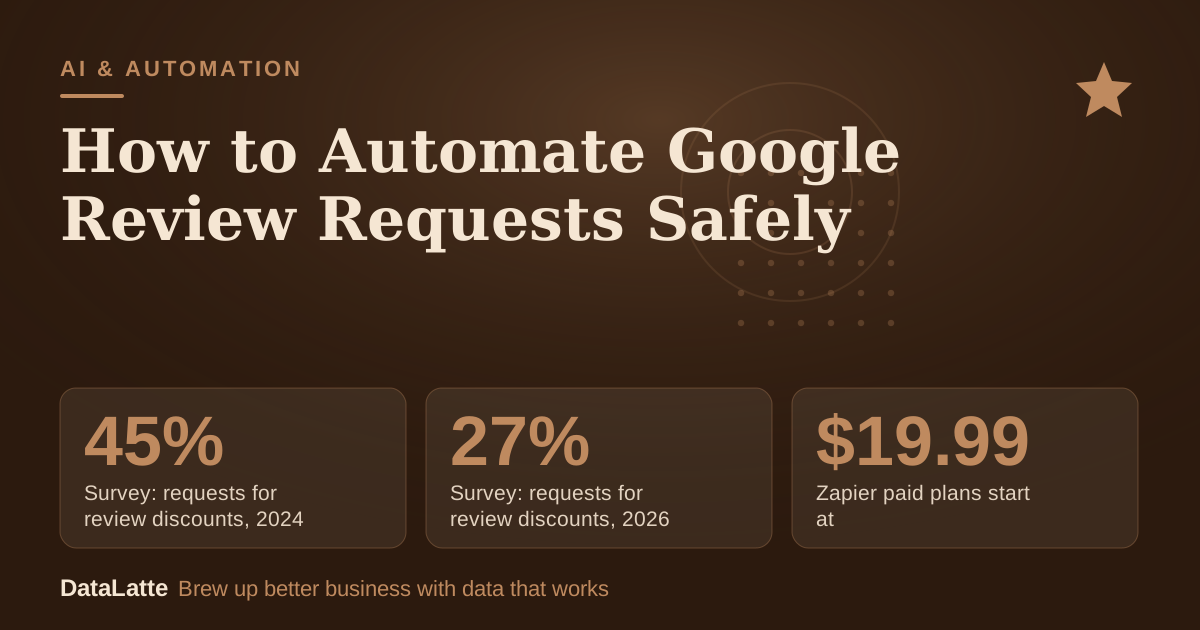
| Zapier | Automates work across more than 9,000 apps; paid plans start at $19.99 a month alongside a free option, per RingCentral (secondary) | Connecting a booking or invoice tool to email or SMS |
| Zapier plus Google Sheets | Costs $20 to $50 monthly and gives more customization than pre-built platforms, per a vendor blog | Owners who want to control the message log and timing |
Check whether your booking or invoicing tool already sends follow-up emails before you add a third-party tool. Built-in follow-ups can cost nothing extra. Free-tier limits and prices change, so read each vendor's live pricing page before you commit.
What Should the Request Say?
Keep the message short and identical for every customer. Thank the customer by name, ask once for an honest review, and include the tracked link as a button or plain text. Do not add an offer, and do not add a screen that sorts customers by mood first.
Use the same wording on every channel. A customer who receives an SMS and then an email should see a consistent message, not two different asks.
Should AI Draft the Replies?
Replies matter because a customer cannot reply to your reply. Tools that draft responses can save time, but they carry risk.
SOCi describes review response automation that generates personalized replies, adjusts tone by sentiment and includes location-specific details. The same page lists the main risks: lack of context in sensitive situations, inconsistent brand voice without training, and over-automation.
A safe rule is to approve every reply to a negative review by hand, and to let automation handle only routine thanks. For multi-step workflows, the
AutoGen guide explains how agents can divide drafting and review tasks, and the
Gemini Flash API guide covers calling a model from a workflow.
What Does Each Review Cost?
The worked example below is for a dog groomer. Every input is an assumption, so replace them with your own numbers after two months of tracking.
| Input or result | Value |
|---|
| Appointments per month | 120 (assumption) |
| Share of customers who leave a review | 5% (assumption) |
| Reviews per month | 6 (120 × 5%) |
| Tool cost, low end | $20 a month (vendor range) |
| Tool cost, high end | $50 a month (vendor range) |
| Cost per appointment | $0.17 to $0.42 ($20 or $50 ÷ 120) |
| Cost per review | $3.33 to $8.33 ($20 or $50 ÷ 6) |
At these assumptions, a $20 tool produces reviews at about $3.33 each, and a $50 tool at about $8.33 each. If the real review rate is higher, the cost per review falls. If your booking tool sends the request for free, your cost per review drops to nothing extra. Measure the real rate before you decide which tool to keep.
Is Asking for Reviews Changing?
BrightLocal's Local Consumer Review Survey reports that requests for discounts have dropped sharply, from 45% in 2024 to 36% in 2025 and 27% in 2026. Read this as what respondents reported, not as proof of what every business does. It supports the point that incentives are a poor base for a review program.
SOCi also states that consumers expect responses to reviews within 24 hours, but it cites no source for that figure. Treat it as a vendor claim to check against your own data.
If you are also automating posts, the
Google posts guide uses a similar sheet-and-trigger pattern. Its template tracks Topic, Status and Date columns, with a Notes column kept for internal use only.
What Is the Setup Checklist?
- Copy your Google review link from your Business Profile and test it on your phone.
- Choose one trigger: a completed appointment or a paid invoice.
- Set the delay. The guide's example uses 2 hours.
- Pick one channel to start: SMS, email or WhatsApp.
- Write one message with no offer and no mood screen.
- Send a test to yourself, then to a small group of real customers.
- Track sends and new reviews for two months, then compare cost per review.
- Approve every reply to a negative review by hand.
FAQ
Can I offer a discount for a review?
No. The dmly guide advises against offering money, discounts, free services or other incentives in return for a Google review.
Can I send the request only to happy customers?
No. Review gating, which privately asks customers if they are happy and sends only the happy ones to Google, goes against Google's policies, according to the dmly guide.
How long after the job should I send it?
The guide's example uses 2 hours after an appointment is completed. Treat that as a starting point and test what suits your customers.
Not always. Some booking and invoicing tools include follow-up messages, and some review software includes SMS and email requests on its base plan. Check your current tool's live pricing page before you buy anything new.
Sources
Want this set up for you? See the
local SEO service or
book a free audit.
→
Survey: requests for review discounts, 2024
BrightLocal Local Consumer Review Survey
↓
Survey: requests for review discounts, 2026
BrightLocal Local Consumer Review Survey
Assumption→
Example delay before a review request
dmly guide example workflow
→
Zapier paid plans start at
RingCentral article (secondary)
See Sources at the end of the article. Cards marked Assumption are examples, not results.
Free for local businesses
Want this applied to your business?
I'll review your Google presence, local SEO, and ad accounts — and send you a specific action plan within 48 hours. No pitch, no pressure.