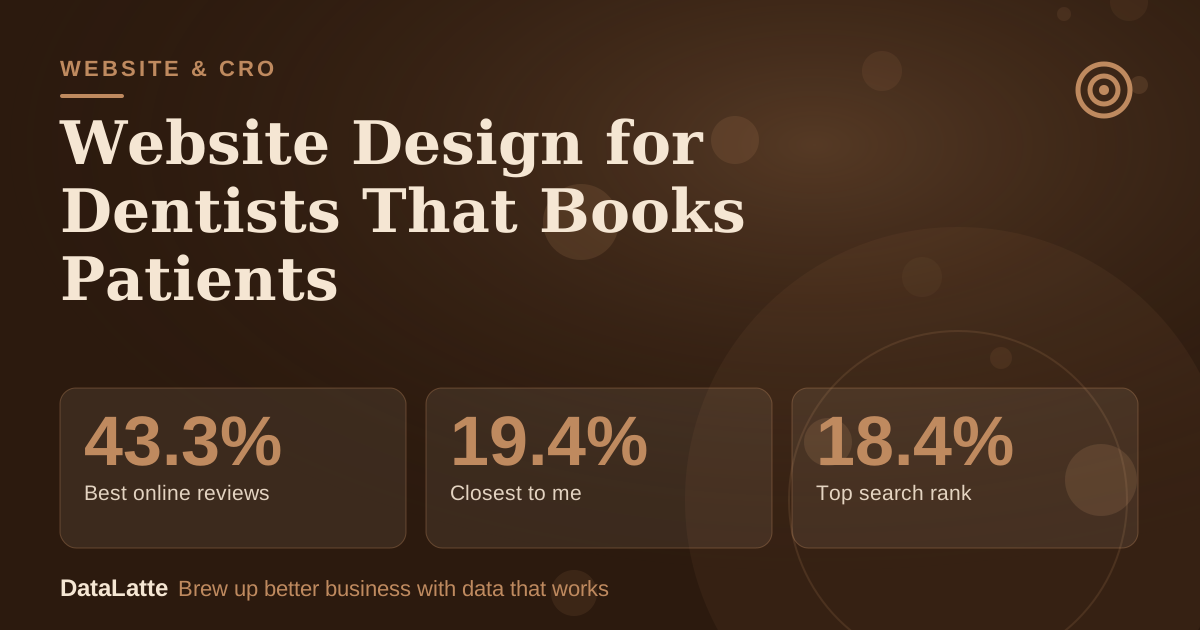
In a 2019 survey of 1,500 Americans, 43.3% said they would pick a dentist from Google based on online reviews. Only 4.5% said they would pick the one with the best-looking website.
The survey was commissioned by a marketing agency, so read it as directional, but the message is useful: patients rarely choose you for your design.
They choose you for reviews and location, then your website has one job, which is to make the next step (call or book) so easy that nobody has a reason to try the next practice.
This guide is for dentists and practice managers in the US, UK, Australia and Canada. It covers the pages you need, how to build a booking flow, how to show trust without breaking advertising rules, the speed and tracking details that quietly cost bookings, and the math on what a better conversion rate is worth.
What the Evidence Says (and Does Not Say)
Two surveys are worth knowing, both from non-neutral sources:
→
Best online reviews
IronMonk survey, 2019
→
Closest to me
IronMonk survey, 2019
→
Top search rank
IronMonk survey, 2019
→
Best-looking website
IronMonk survey, 2019
See Sources at the end of the article. Cards marked Assumption are examples, not results.
A more recent
Dentaly.org survey of 1,099 Americans (October 2023) reports that 83% use online reviews to evaluate a dentist, 8 in 10 use reviews as the first step in choosing a new dentist, and 52% would only consider a dentist with at least 10 online reviews.
Both come from organisations with a commercial interest, and Dentaly notes that self-reporting can exaggerate.
What follows from that:
- Your site is a conversion tool, not a portfolio. Judge it by calls and booking requests.
- Reviews and your map listing do the selling before the click. See our Google Business Profile checklist and reputation management for dentists.
- The surveys do not measure how many patients visit a practice website before booking, so nobody can honestly quote you that number.
Step 1: Get the Top of the Homepage Right
Patients arrive with one of a few goals: find an emergency dentist, check insurance or payment options, learn about one treatment, or compare practices. On a phone, the first screen should answer:
- What you do and where: "Family and cosmetic dentistry in [town]".
- How to act: a "Book online" button and a tap-to-call number.
- Whether you are taking new patients, and when you are open.
- Who they will meet: a real photo of your team or practice, not a stock smile.
- One trust cue you can prove, such as your Google rating and review count.
Our above-the-fold design guide explains the layout.
Step 2: Build the Right Pages
| Page | What to include |
|---|
| Home | Booking, location, hours, new-patient note, rating |
| One page per treatment | Check-ups, fillings, crowns, implants, whitening, orthodontics, emergency, children |
| New patients | What to expect, forms, insurance and payment, accessibility |
| Meet the team | Photos, qualifications, a personal line |
| Contact | Map, parking, transport, hours, short form, phone |
| FAQ or blog | Costs, anxiety, aftercare, emergencies |
Each treatment page should say what it is, who it is for, what happens at each visit, how long it takes, aftercare and how to book. Write for an anxious adult, not a colleague. If you show prices, say what moves them: "from" prices for routine work, ranges for complex cases.
Step 3: Make Booking Effortless
- Offer online booking through your practice software if it supports it, and keep a phone number beside it. Our online booking for healthcare guide goes into the options.
- Keep forms short: name, phone, email, reason for visit and preferred time. See booking form optimisation.
- Show a tap-to-call button on every mobile page.
- Say what happens next and when: "We reply within one working day" only if you can keep that promise.
- Put emergency instructions on their own page, including out-of-hours advice.
A patient booking from a phone at lunchtime will not fight a long form.
Step 4: Build Trust Without Breaking the Rules
Trust is the real product. Use real photos of reception, treatment rooms and team, bios with qualifications, review ratings with a link to your Google listing, clear infection-control information in plain language, and notes on accessibility and anxious patients.
Be careful with testimonials and before-and-after images. In the UK, secondary summaries of General Dental Council guidance (via the
DDU's guide to advertising ethically, not the regulator's own text) say marketing must be accurate and not misleading, and that consent for using patient information such as photos or testimonials should be specific and contemporaneous.
The same principle is a safe default elsewhere. The US, Canada and Australia each have their own dental board and advertising rules that vary by state or province, so check your regulator's current standards before publishing patient images, superlatives ("best dentist in town") or outcome guarantees. Get written consent for every image.
Step 5: Local Search Basics on the Page
Most patients search locally, and your site supports your map listing.
- Give every page a unique title and heading naming the service and area where natural.
- Keep your name, address and phone number identical to your Google profile.
- Add structured data. Schema.org defines Dentist as a type under MedicalBusiness and LocalBusiness, with properties such as address, telephone and openingHours, so search engines can read your practice details.
- Embed a map and write directions in text.
- Link treatment pages to each other and to the booking page.
Our local SEO for dentists guide covers the rest.
Step 6: Speed, Mobile and Accessibility
Google's
Core Web Vitals guidance on web.dev sets "good" thresholds at 2.5 seconds or less for Largest Contentful Paint, 200 milliseconds or less for Interaction to Next Paint, and 0.1 or less for Cumulative Layout Shift, assessed at the 75th percentile of page loads, mobile and desktop separately. Check your own pages in Search Console.
The usual causes of a slow dental site are oversized photos, auto-playing video and heavy sliders. Our Core Web Vitals guide and website speed guide show what to fix first.
Also cover contrast, readable text, image alt text and keyboard navigation. Our accessibility guide has a starter checklist. Accessibility rules differ by country, so ask a professional what applies to you.
Step 7: Privacy and Tracking (Read This Before Adding a Pixel)
Tracking tools are where dental sites take on risk. In the US, the Department of Health and Human Services' Office for Civil Rights published a bulletin in December 2022 on how HIPAA applies to cookies, web beacons and pixels on provider websites.
A
McDermott Will & Emery summary reports that on 20 June 2024 a Texas federal court vacated one part of that bulletin, the position that HIPAA applies when a tracker captures an IP address tied to a visit to a public, unauthenticated page about health conditions or providers, and that OCR withdrew its appeal on 29 August 2024. The rest of the bulletin was left intact.
What that means in practice, with the caveat that this is not legal advice: the safest approach is to keep ad pixels and analytics tags off patient portals and any page where someone enters health details or an appointment reason, and to take advice from a privacy lawyer or your compliance provider before sending form data to ad platforms.
Outside the US, UK GDPR and Canadian and Australian privacy law add consent requirements for cookies and tracking, so use a consent banner where required. Our cookie consent guide covers the basics.
Step 8: Decide Who Builds It
| Option | Fits | Watch out for |
|---|
| Website builder | Small practices needing something quick | You write all the content; design limits |
| Dental website specialist | Practices wanting integrated booking and compliance experience | Ongoing fees, template feel, who owns the site |
| Freelancer or custom build | Practices wanting a distinct brand | Needs a clear brief and a maintenance plan |
Whichever route you choose, make sure you own the domain and have admin access. Our comparison of
DIY versus a professional developer can help.
A dental website should feel like a calm waiting room: uncluttered, welcoming, and with clear signs telling you where to go next.
The Math
What is a better booking rate worth? The numbers below are all assumptions for illustration. They are not benchmarks, because no trustworthy public figure exists for dental website conversion. Replace them with your own analytics and appointment book.
| Tough | Base | Strong |
|---|
| Monthly website visitors (assumption) | 800 | 800 | 800 |
| Visitor to booking request or call rate (assumption) | 2% | 4% | 6% |
| Requests and calls | 16 | 32 | 48 |
| Request to attended new patient (assumption) | 60% | 60% | 60% |
| New patients per month | 9.6 | 19.2 | 28.8 |
| First-year value per new patient (assumption) | $900 | $900 | $900 |
| First-year value of the month's new patients | $8,640 | $17,280 | $25,920 |
Moving from Tough to Base adds 9.6 patients a month in this example, worth about $8,640 in first-year revenue per month of traffic. The exact figure is not the point.
A fix that lifts the booking rate from 2% to 4% pays out every month the site is live, so even small improvements can outweigh the one-off cost of making them.
Your inputs will differ: count your own monthly visitors in Search Console, your calls and forms from tracking, the share who attend, and the real average value of a new patient.
If you want to find the leak first, count: visitors, then calls and bookings, then attended appointments. The biggest drop is the thing to fix. Often it is not the design but phones that go unanswered.
Do This Today
- Open your site on your phone. Time how long it takes to find a way to book or call from the homepage. If it is more than a few seconds, move the button up.
- Count last month's visitors (Search Console or analytics), calls, form requests and attended new patients. Write down your visitor-to-booking rate.
- Run your homepage and one treatment page through a Core Web Vitals check and compress your largest photos.
- Check your tracking: remove ad and analytics tags from any page that collects health details or appointment reasons until you have taken privacy advice.
- Add a Dentist structured-data block with your address, phone and hours, and match them exactly to your Google profile.
FAQ
Q: What pages does a dental website need?
A: At minimum: home, a page per main treatment, new-patient information, team, contact and location, and a booking option. Add reviews and an FAQ for common questions.
Q: Should I list prices?
A: It depends on your regulator and your market. Many practices explain what drives cost and show "from" prices for routine care, which can reduce unqualified calls. Complex cases should be described as varying.
Q: Can I use testimonials and before-and-after photos?
A: Often, with specific written consent and within your dental regulator's advertising rules. Standards differ by country and state, so check current guidance before publishing.
Q: Does a better-looking website mean more patients?
A: Not by itself. In the 2019 IronMonk survey, only 4.5% said they would choose a dentist for the best-looking site, versus 43.3% for reviews. Clarity, speed and an easy booking flow matter more than visual polish.
Q: How often should I update the site?
A: Review hours, team, insurance and emergency information at least quarterly, and update whenever something changes.
Sources
Want a dental website built to rank locally and book patients? See our
website service, our Google Ads guide for dentists, or
contact DataLatte.