A San Diego coffee shop earns map pack placement by giving Google three things: a verified and complete Google Business Profile, a steady flow of recent reviews, and a business name, address and phone number that match everywhere they appear. Verification comes first, because an unverified profile does not show publicly.
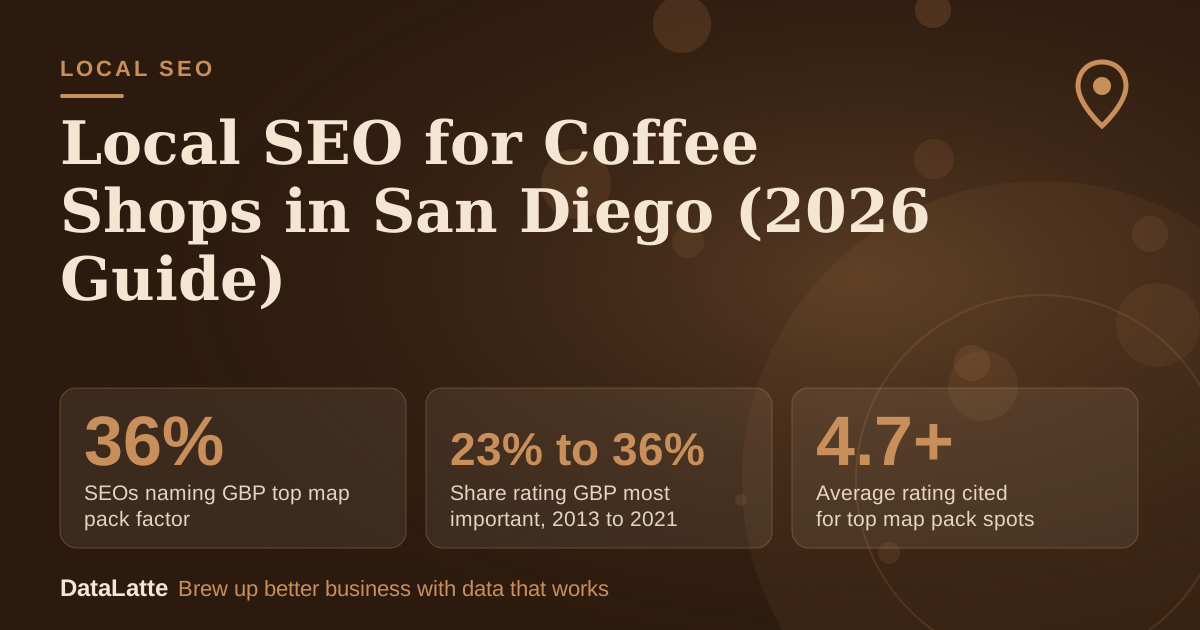
Ahrefs (secondary) cites a BrightLocal survey in which 36% of SEOs rated the Google Business Profile the most important map pack ranking factor in 2021, up from 23% in 2013. This guide turns those points into steps for San Diego, CA.
→
SEOs naming GBP top map pack factor
BrightLocal survey via Ahrefs, as of 2021 (secondary)
↑
Share rating GBP most important, 2013 to 2021
Same BrightLocal series, 2013 vs 2021 (secondary)
→
Average rating cited for top map pack spots
Unsourced claim on AccountabilityNow (secondary)
→
Local pack lift in one landscaping anecdote
Single anecdote from another trade (secondary)
See Sources at the end of the article. Cards marked Assumption are examples, not results.
Why does verification come before anything else?
Setting up a Google Business Profile is free. Google describes its
Business Profile as a free listing on Search and Maps. Free does not mean visible, though.
Per Diem's coffee shop guide (secondary) states that without verification, your updates will not show publicly and customers may not find the business.
An older 2020 walkthrough from
BrewRound (secondary) says Google mails a letter containing a code to the business location, and the profile does not appear in results until it is verified. Treat that as the 2020 process. Confirm the current steps in your dashboard before you start, and do not edit the listing expecting changes to appear until verification is complete.
What is the 10-step Google Business Profile checklist?
Work through these in order. Each step either traces to a source in this guide or is a practical default you can adjust.
- Verify the listing before editing anything else, so changes reach the public profile.
- Choose "Coffee shop" as the primary category rather than something broad like "Restaurant", as Per Diem (secondary) recommends.
- Add related categories such as Café or Espresso bar. BrewRound notes that one category is selected at signup and more can be added later.
- Write a description that names San Diego and your neighbourhood in plain language. The Google Business Profile tips for coffee shops cover the wording in more detail.
- Upload photos of the interior, the menu board and the storefront, and replace them when the look changes.
- Publish posts and check each one shows Live status. Google shows posts on Search and Maps only when they are Live.
- Seed the Q&A with questions customers actually ask. Per Diem suggests answering questions about free Wi-Fi, dairy-free options and dogs on the patio before customers do.
- Check that messaging is available on the listing. Google lets users message businesses directly through their listings, per Per Diem.
- Set up a review request routine, covered in the worked example below.
- Compare your name, address and phone with your website and directory listings, and fix any mismatch. The full optimisation guide walks through the same checks.
How often should a San Diego coffee shop post?
The Restaurant HQ (secondary) recommends coffee shops post on social media at least once per week, ideally one to two times per day. That guidance is for social channels, but the same rhythm works on the profile. A weekly post about a seasonal drink, a new pastry or a neighbourhood event keeps the profile active.
Check status after each post. Google's
post help page says a post is public on Search and Maps when its status is Live, while Pending and Not approved posts do not show. A post that never goes Live is effectively a post that never happened for searchers.
How many reviews does a coffee shop need?
Review benchmarks in this area are thinly sourced.
AccountabilityNow (secondary) claims that businesses with over 50 reviews and a 4.7+ average rating dominate top map pack spots, without citing a source. Treat that as a tracking target for your own shop, not a guarantee.
The same page describes one landscaping firm that cleaned up its NAP data and saw an 18% jump in local pack appearances. That is a single anecdote from a different trade, so do not build your plan around it. Google's
review guidance confirms that reviews show next to your Business Profile in Maps and Search, which makes every review part of what a searcher sees.
How does a review request routine work in numbers?
The inputs below are assumptions. Replace them with your own till data before relying on the output.
- Customers per week: 120 (assumption)
- Share asked for a review: 60% (assumption)
- Share of those asked who leave a review: 15% (assumption)
- Cost of a printed card or text message from your existing phone: $0 (assumption)
Calculation: 120 × 0.60 = 72 requests per week. 72 × 0.15 = 10.8 reviews per week. Over four weeks that is about 43 reviews. At the same rate, the 50-review benchmark above is reached in about five weeks, at roughly 54 reviews.
The steady rate matters more than a burst. Ask customers to mention what they came in for, such as a specific drink, the wifi or the seating, because the wording of a review tells searchers what the shop is known for.
Which citation rules matter for San Diego?
Citations are mentions of your name, address and phone number on other websites. The point is consistency: the same details, character for character, everywhere they appear. A street abbreviation or a different phone format on one directory creates a mismatch that is easy to miss.
Google's
location assets help page states that location data used in Google Ads is sourced directly from Google Maps and Google Business Profile, and that successful corrections made there flow into linked Google Ads accounts. That makes your Business Profile the reference point for both organic and paid listings. Check the directories you already appear on before adding new ones, and fix errors at the source.
Which keywords and neighbourhoods should a San Diego shop target?
Use the neighbourhood names customers actually use. Name the area in your profile description, your website title tags and any location page, without repeating keywords unnaturally. If you run paid search, the
coffee shop ad keyword guide covers how to build and test that keyword set.
No search volume figures are sourced for this guide, so check current volumes in a keyword tool before you prioritise terms. Pick neighbourhoods where your customers already come from, and check that each one has a matching section on your website.
How should the website support the profile?
Your website should repeat the same name, address and phone number as the profile, and each location page should name the neighbourhood it serves. Embedding a Google Map on the contact page helps visitors find the door. The
Google Maps embed guide covers the setup.
Keep the website and profile in sync when hours change, especially around holidays. A mismatch between the two is a common reason a customer arrives at a closed door.
How do you measure whether the work is working?
Start with GBP Insights to track searches, views and actions such as calls, direction requests and website visits. Pair it with Google Search Console to see organic clicks by page. For map pack position, check your top keywords from a private browsing window once a week and log the result, since results vary by location.
Set a baseline in the first week before changing anything, so later movement can be compared against it. The
coffee shop Google Maps guide explains what to look for in those results.
FAQ
Is a Google Business Profile free for a San Diego coffee shop?
Yes. Google describes its Business Profile as free to set up on its
sign-up page. Paid placement through Google Ads is a separate cost.
Why are my profile edits not showing?
According to
Per Diem (secondary), updates will not show publicly until the listing is verified. Also check whether recent posts show Live status, because Pending and Not approved posts do not appear on Search or Maps.
Which category should a coffee shop pick?
Per Diem recommends "Coffee shop" or a related term rather than a broad category such as "Restaurant" (secondary). BrewRound's 2020 guide says more categories can be added after signup (secondary).
How many reviews do I need to compete in San Diego?
No sourced figure applies to every market. AccountabilityNow cites 50+ reviews at a 4.7+ average as a benchmark, without a source (secondary). Use it as a target to track, and measure your own progress against your competitors' listings.
Sources
Compare your profile against the checklist above, then
book a free audit to see where your San Diego listing falls short. For ongoing work on the profile and map pack, see the
local SEO service. If you want paid placement alongside the profile, the
Google Ads service covers that.
Free for local businesses
Want this applied to your business?
I'll review your Google presence, local SEO, and ad accounts — and send you a specific action plan within 48 hours. No pitch, no pressure.